My Bible - Verse+Audio
- 4.8
- Rating
- 10.00M
- Installs
- Free
- Price

 Analysis by App-foxy
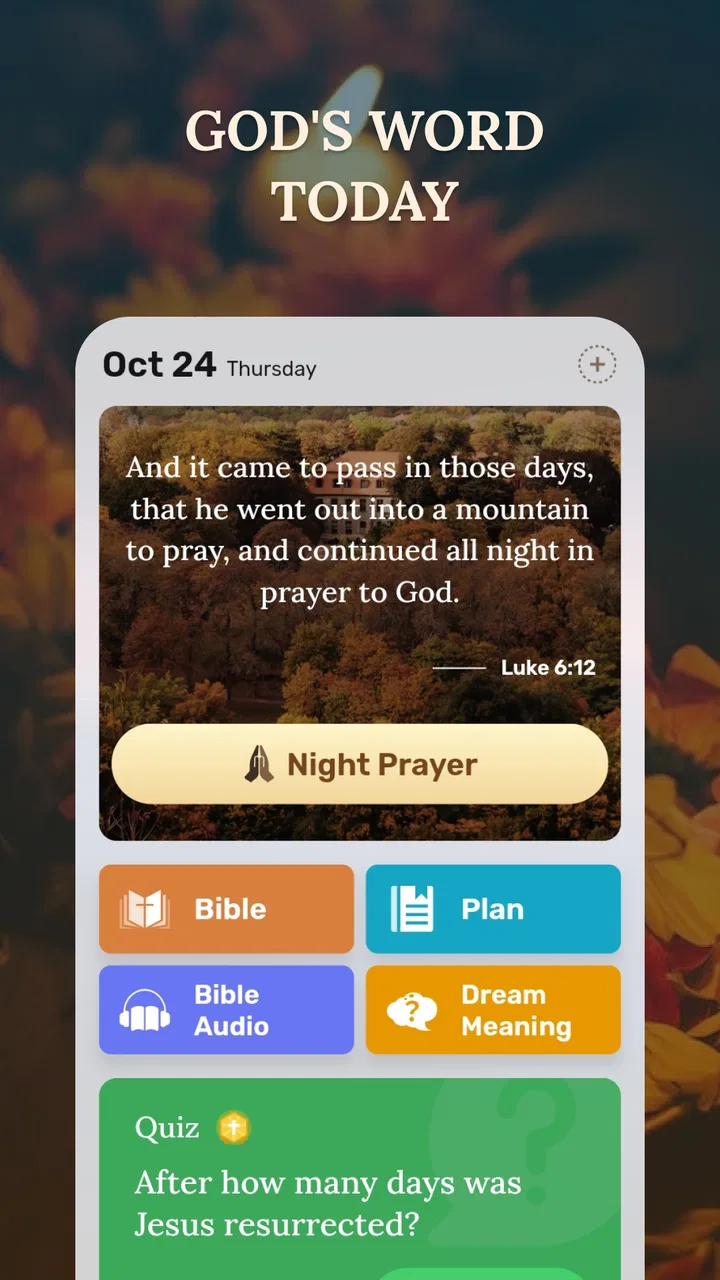
I often turn to a Bible app in the middle of an ordinary day rather than during a carefully planned study session. I may have a few quiet minutes before work, want to hear a passage while doing chores, or need a verse that is easy to revisit without carrying a printed book. That is the situation where My Bible makes the most sense. It is a free Books & Reference app from JATHLEHEM LIMITED, built around Bible reading, offline access, daily verses, and audio-oriented use.
After spending time with it, I see this as a practical companion rather than a complete replacement for every Bible study tool. Its strongest idea is convenience: keep Scripture available when an internet connection is unreliable, then make a short daily reading habit easier to maintain. The experience is approachable enough for someone opening a Bible app for the first time, while regular readers can use it as a quick reference during commutes, breaks, or personal reflection.
The app is rated for Everyone, which fits its straightforward purpose and broad audience. It is free to install, although optional in-app purchases range from around five dollars to around twenty dollars per item. That distinction matters: the basic decision is easy because there is no purchase required to try it, but I would still check which extras are included before paying for anything.
You May Also Like

 Pandora - Music & Podcasts
Pandora’s Music Is Easy to Start, but Harder to Recover
Pandora’s strength is its low-effort path from a seed to a station. Its weak spot is how much confidence it asks you to place in connection, setup, and quiet recovery.

 8 Ball Pool
 Is Built on Rivalries, Rematches, and Routine
A close look at the rivalries, rematches, shared routines, and unanswered safety questions that turn a quick pool match into a persistent mobile community.

 Samsung Music
’s Quiet Strength Is Playing What You Already Own
Its reach comes less from spectacle than from dependable access to a personal library. That simplicity is both the app’s strongest retention engine and its ceiling.

 AccuWeather: Weather Radar
AccuWeather Review: A Quick, Clear Forecast for Everyday Decisions
For everyday plans, the best forecast is the one you can understand quickly. AccuWeather makes rain timing, radar, and local conditions easy to act on, with a few trade-offs.

 Hill Climb Racing
Why Hill Climb Racing Still Turns Crashes Into One More Run
A tiny car, a bumpy hill and one more upgrade: Hill Climb Racing keeps resurfacing because its simple chaos makes every near-miss feel personal.

 AliExpress - Shopping App
AliExpress Makes Global Shopping Feel Personal, but Shoppers Bear the Risk
AliExpress turns a global marketplace into a pocket-sized discovery engine. Its reach is useful, its shopping loop compelling, and its trade-offs easy to miss.
More From Our News Desk
View All News


From a spare moment to a usable reading routine
I like to begin a reading habit with a step small enough to fit into a busy day, then give it room to grow when time allows. This section looks at how a brief prompt can become a more deliberate routine, including a simple way to keep context in view. The next part turns to what changes when reading shifts from a quiet moment to a heavier stretch of use.
Starting with the right expectation
The first useful question is not whether this is the most advanced Bible app available. It is whether I want a convenient place to read or listen without depending on a constant connection. My Bible is particularly suitable when the starting condition is simple: I want Scripture close at hand, I want a daily verse to prompt me, and I do not want to search through several unrelated apps to begin.
That focus gives the app a calmer role than a large study platform. Someone looking for an extensive library of scholarly notes, original-language tools, elaborate cross-references, or a full sermon-management system may prefer a more specialized alternative. My Bible works better when the desired outcome is a repeatable reading moment, not an academic research project.
The app runs on Android devices using version 6.0 or later. That makes it accessible on a wide range of phones, including older devices that may not support newer applications. Its current version is 1.1.0, so I would approach it as a focused tool whose value comes from doing a few useful things simply rather than presenting an enormous number of settings.
Step one: preparing for offline reading
The offline angle changes how I would use it. I would prepare while connected, making sure the material I expect to need is available before leaving home. That small habit is more important than it sounds. If I wait until I am underground, traveling, or dealing with weak reception, I am already asking the app to solve the wrong problem.
For a realistic routine, I might open the app with Wi-Fi in the morning, read the daily verse, and spend a few minutes with a longer passage. If I know I will be away from reliable service later, I would do that preparation before heading out. The benefit is not just saving mobile data. Offline access also removes the interruption of waiting for a page to load at the exact moment I am trying to concentrate.
This is one of the app’s less obvious strengths: it supports a handoff from a connected environment to a disconnected one. I can begin the routine at home and continue it elsewhere. That makes it more useful than a browser bookmark, especially for people who read during travel, in buildings with poor reception, or in places where keeping a connection active is inconvenient.
Step two: using the daily verse without letting it become the whole routine
The daily verse is a helpful entry point because it lowers the effort required to begin. On a busy day, opening a short selection feels more manageable than deciding where to read in a large text. I like that kind of prompt for habit-building, but I would not treat the verse alone as a complete study session. A single excerpt can encourage reflection, yet its surrounding context is still important.
My preferred workflow would be to read the daily verse first, then continue into the surrounding passage when I have time. That turns the prompt into a doorway rather than a replacement for reading. It also reduces the risk of reacting to a sentence in isolation. If I were sharing this routine with a friend, I would suggest asking, “What comes before and after this verse?” before drawing a firm conclusion from it.
There is a practical trade-off here. Daily prompts are excellent for consistency, but they can make reading feel fragmented if I only open the app for the highlighted selection. People who already follow a structured plan may find a dedicated reading-plan app more suitable. For everyone else, the daily verse is a gentle way to create a starting point, provided it leads into broader reading instead of ending the session.
Step three: switching from reading to audio
The audio side is useful when my eyes and hands are occupied. I can imagine using it while preparing breakfast, walking, or doing routine household work. That is a different use case from silent reading, and it gives the app a second path into the same material. Reading encourages me to pause over a line; listening lets the text accompany an activity.
The handoff between those modes is where I would use some discipline. I would listen when I need continuity, then return to the written passage when a sentence deserves closer attention. Audio is not automatically better than reading, and it is not ideal in every setting. Noise, interruptions, and divided attention can make listening less precise. The most effective workflow is therefore not “audio instead of reading,” but “audio for access, text for closer inspection.”
That distinction is a concrete reason to keep both options available. An app that only supports reading would be less flexible during busy parts of the day, while an audio-only tool would be less comfortable for checking wording or comparing nearby verses. My Bible’s appeal comes from being able to move between the two kinds of engagement without changing the general purpose of the session.
Managing the handoff from private use to conversation
A Bible app often starts as a personal tool but ends up supporting a conversation. I might read something that I want to discuss with a family member, use a passage during a small group meeting, or return to a verse later after a friend mentions it. In those moments, speed matters. I want to get back to the relevant text without turning the conversation into a long search exercise.
My Bible is best suited to that informal handoff: open the app, locate the passage, read or listen, then discuss it. I would still keep a printed Bible or a more reference-heavy app nearby for formal study where exact translation comparison, extensive notes, or detailed navigation is central. The app’s convenience is valuable, but convenience and depth are not the same thing.
One useful habit is to separate “finding a verse” from “understanding a passage.” The app can help with the first part by keeping reading close and reducing setup. The second part may require a commentary, a study Bible, or a conversation with someone knowledgeable. Recognizing that boundary prevents disappointment and helps the app occupy the role it handles well.
What the completed workflow feels like
When the workflow goes well, the result is modest but meaningful: I have a dependable way to begin reading, continue offline, switch to audio when necessary, and return to the written text for reflection. That is enough to support a daily habit without making the habit feel like a project.
I especially appreciate the low-pressure nature of this outcome. The app does not need to become the center of my day to be useful. A short morning reading, an audio passage during a walk, or a quiet evening return to the daily verse can each count as a successful use. The value comes from reducing friction between the intention to read and the act of opening Scripture.
Its broad adoption also suggests that the basic concept resonates with many users: the app has an average rating of 4.8 from around forty-one thousand ratings and has passed ten million installs. I would not use popularity as proof that it is right for me, but those figures do reinforce the impression that it serves a familiar, practical need rather than an unusually narrow one.
Where the flow breaks
The first possible break is preparation. Offline access is most helpful when I plan ahead, so someone who expects every resource to appear instantly without any setup may find the experience less smooth. The app’s central promise is convenience in disconnected situations, but that convenience still depends on making sensible preparations while connected.
The second break is attention. Audio can make Scripture available during another activity, but multitasking can also reduce comprehension. If I am driving, working around machinery, or dealing with frequent interruptions, I would treat listening as a background option rather than a substitute for focused reading. For difficult or emotionally important passages, I would return to the text and give it my full attention.
The third break is depth. My Bible is not the right choice for a reader whose main goal is detailed theological research. If I need multiple translations side by side, extensive annotation, historical background, or a carefully organized study workflow, I would choose a dedicated study resource instead. This is not a flaw in a focused app; it is a reminder to match the tool to the task.
There is also a financial point to keep in mind. The app is free, which makes testing it straightforward, but optional purchases can cost from around five dollars to around twenty dollars per item. I would use the free experience first, identify the exact problem an extra is meant to solve, and only then decide whether it improves my routine. Paying for a feature I rarely use would undermine the app’s otherwise simple value proposition.
Who will get the most from it
I would recommend My Bible to someone who wants a Bible app that feels approachable, supports offline access, and offers a daily starting point. It is a good fit for a new reader who needs a clear way to begin, for a regular reader who wants a portable companion, and for anyone who values the choice between reading and listening.
It also suits people whose schedules are inconsistent. If I cannot promise myself a long session every day, a daily verse gives me a small opening, while offline availability helps me use unexpected spare time. The app can fit around a routine instead of demanding that I build an entirely new one.
I would be more cautious about recommending it to an advanced student who expects a complete digital study desk. That user may be happier with a resource designed around notes, references, language tools, and structured research. I would also steer away from it if someone wants only a printed-book experience, since the convenience of an app comes with the usual distractions and dependence on a phone.
Device fit, cost, and everyday practicality
Because it supports Android 6.0 and later, the app is a reasonable candidate for older Android phones that are still working well. I would still consider available storage, battery condition, and whether the device is comfortable for extended reading, but the minimum operating-system requirement is not especially demanding.
The Everyone age rating makes it suitable for a household where different generations may use the same general resource. That does not remove the need for personal judgment about how children engage with religious material, but it does make the app’s intended audience broad and uncomplicated.
For me, the best test would be a short trial across several situations: one connected reading session, one offline session, one audio session, and one return to a passage after the daily prompt. That sequence reveals much more than opening the app once. If it makes those handoffs feel natural, it is doing its job. If I keep wishing for research tools or a more elaborate plan, I have learned that I need a different category of app.
My final take after following the full routine
My Bible succeeds by connecting a few useful moments: the intention to read, the practical need for offline access, the convenience of a daily verse, and the flexibility of audio. I would not describe it as an all-purpose Bible study suite, and I would not choose it for intensive academic work. I would choose it as a dependable everyday companion that helps Scripture remain available when time, signal, or attention is limited.
The strongest reason to try it is the complete handoff from connected preparation to offline reading and optional listening. That workflow feels realistic, especially for people who want a habit that survives travel and busy days. Start with the free version, prepare before going offline, use the daily verse as a doorway rather than the entire meal, and switch back to text whenever careful reading matters.
In my experience, that is where the app finds its balance. It is simple enough to open without planning, flexible enough to follow a changing day, and honest enough in its limitations that I can pair it with another resource when deeper study is needed. For a free Bible and reference app with a broad audience, that is a useful result—and one I would comfortably recommend to a friend seeking a practical way to read or listen more regularly.
FAQs for My Bible - Verse+Audio
01What features does My Bible - Verse+Audio offer?
My Bible - Verse+Audio provides a comprehensive digital Bible experience with features such as scripture reading, audio playback, daily devotionals, and verse sharing. The app supports multiple translations and offers offline access, which is perfect for users who want to read or listen to the Bible without an internet connection.
02Is My Bible - Verse+Audio free to use?
My Bible - Verse+Audio is free to download and use, offering access to a wide range of features without cost. However, there may be optional in-app purchases for additional translations or premium content. Users can enjoy a robust experience with the free version, including daily devotionals and audio scriptures.
03How user-friendly is the My Bible - Verse+Audio interface?
The app is designed with user-friendliness in mind, featuring a clean and intuitive interface. Navigation is straightforward, allowing users to easily access different sections like daily devotionals, audio playback, and scripture search. The app also includes customization options such as font size adjustments and night mode for comfortable reading.
04Can I use My Bible - Verse+Audio offline?
Yes, My Bible - Verse+Audio supports offline access, enabling users to read and listen to their favorite scriptures without an internet connection. This feature is especially useful for users in areas with limited connectivity or those who prefer to use the app during travel or in remote locations.
05Does My Bible - Verse+Audio have a social sharing feature?
My Bible - Verse+Audio includes a social sharing feature that allows users to share their favorite verses or devotionals with friends and family via social media or messaging apps. This feature encourages community engagement and helps users share their spiritual journey with others easily.
Pros
- User-friendly interface enhances navigation.
- Daily verse notifications for inspiration.
- Supports multiple Bible translations.
- Offline mode for uninterrupted reading.
- Audio feature for hands-free listening.
Cons
- Ads can be intrusive at times.
- Limited customization options.
- Initial setup requires internet.
- Audio feature needs stable connection.
- Some translations require purchase.

My Bible - Verse+Audio
Gallery